How to create a TIMS account
Share with:Updated 2 years ago
TIMS stands for Transport Integrated Management System. It’s a system that enables people access NTSA services online. You will need a TIMS account if you are going to enroll for a driving license for the following reasons:
1. The test that you will take is booked on the TIMS account so you would have to be registered to book the test.
2. Before you do the road driving test, you will need a provisional driving license. It’s a slip that will act as a driving license while on the road. The PDL is applied on the TIMS account which is another reason you would need a TIMS account
Follow these steps to create a TIMS account:
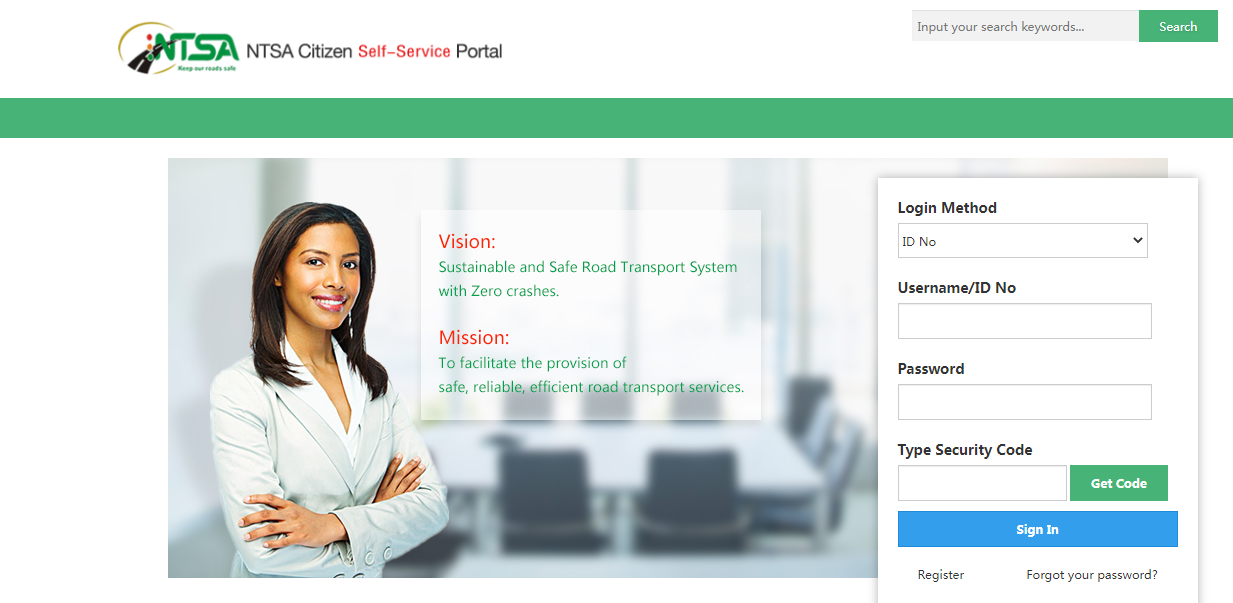
1. Use this link to open the TIMS login page https://tims.ntsa.go.ke/login_csp.jsp
2. Click register.
3. Enter your ID Serial No. on the page that is displayed and click verify.
4. Enter mother’s maiden name then click verify again.
5. Enter your Kra pin and click verify. Click next to proceed with the process.
6. Enter your occupation and your phone mobile number and click verify phone.
7. Fill all the mandatory fields i.e county of birth, sub-county, nationality, physical address, box No, code, town, postal address and postal code and click next
8. Confirm the information you are submitting is correct. A password will be sent to you that you will use to login to your TIMS account.
You have successfully created a TIMS account. . If you encounter any challenges in the process, please send us a message through our contact us page and we will do it for you.
Download our Revision materials app here:
TIMS stands for Transport Integrated Management System. It’s a system that enables people access NTSA services online. You will need a TIMS account if you are going to enroll for a driving license for the following reasons:
1. The test that you will take is booked on the TIMS account so you would have to be registered to book the test.
2. Before you do the road driving test, you will need a provisional driving license. It’s a slip that will act as a driving license while on the road. The PDL is applied on the TIMS account which is another reason you would need a TIMS account
Follow these steps to create a TIMS account:
1. Use this link to open the TIMS login page https://tims.ntsa.go.ke/login_csp.jsp
2. Click register.
3. Enter your ID Serial No. on the page that is displayed and click verify.
4. Enter mother’s maiden name then click verify again.
5. Enter your Kra pin and click verify. Click next to proceed with the process.
6. Enter your occupation and your phone mobile number and click verify phone.
7. Fill all the mandatory fields i.e county of birth, sub-county, nationality, physical address, box No, code, town, postal address and postal code and click next
8. Confirm the information you are submitting is correct. A password will be sent to you that you will use to login to your TIMS account.
If you encounter any challenges in the process, please send us a message through our contact us page and we will do it for you.
Download our Revision materials app here: https://play.google.com/store/apps/details?id=com.techiejose.Revise